
Video tools
Picmal’s Video section has two tools for building videos: Combine Videos joins clips end-to-end, and Slideshow turns photos and screen recordings into one framed video. Both run entirely on your Mac.
Combine Videos
Section titled “Combine Videos”- Select Combine Videos in the sidebar
- Drop two or more videos into the window
- Drag rows to set the order, the list order is the play order
- Click Combine
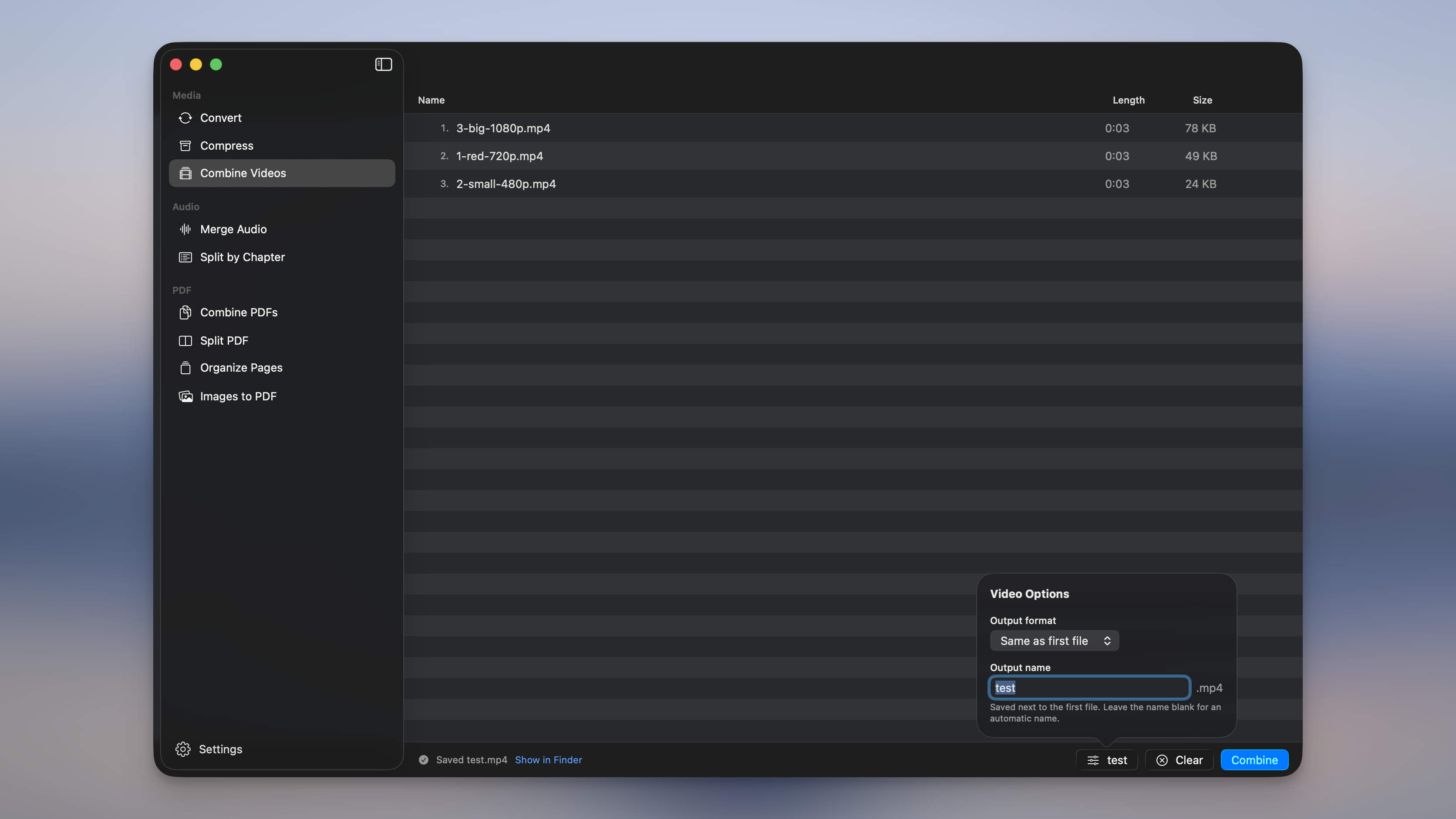
The combined file is saved next to the first one as <name> (combined).<ext>. If that name is taken, Picmal counts up instead of overwriting, <name> (combined) 2.mp4, and so on.
- Drag rows to reorder; the number on each row is its position in the finished video.
- Select rows and press Delete to remove them, or right-click for Remove / Show in Finder.
- A file Picmal can’t read as video shows an orange warning and blocks the combine. Remove it and try again.
Lossless when it can be
Section titled “Lossless when it can be”When every clip in the list already shares the same codec, resolution, and frame rate, Picmal joins the streams without re-encoding. It’s fast and there’s no quality loss. Mix formats or sizes (say a 720p MP4 and a 1080p WebM) and it scales each clip onto the first one’s frame and re-encodes to match. Either way you get one continuous video.
Output format
Section titled “Output format”Open Video Options to choose the output format. Leave it on Same as first file to keep the first clip’s format (the setting that keeps a matched combine lossless) or pick MP4, MOV, MKV, or WebM to convert everything as it combines. WebM is re-encoded to VP9; the rest use H.264. Your choice is remembered between sessions.
Output name
Section titled “Output name”In the same popover, type a name for the combined file, or leave it blank for the automatic <name> (combined) name. The extension follows the output format you picked. The file is always saved next to the first input.
Slideshow
Section titled “Slideshow”- Select Slideshow in the sidebar
- Drop your images and videos in, mixed formats and sizes are fine
- Drag rows to set the order, the list order is the play order
- Pick a resolution in the bottom bar, and set the frame and seconds per image in the options popover
- Click Create Slideshow
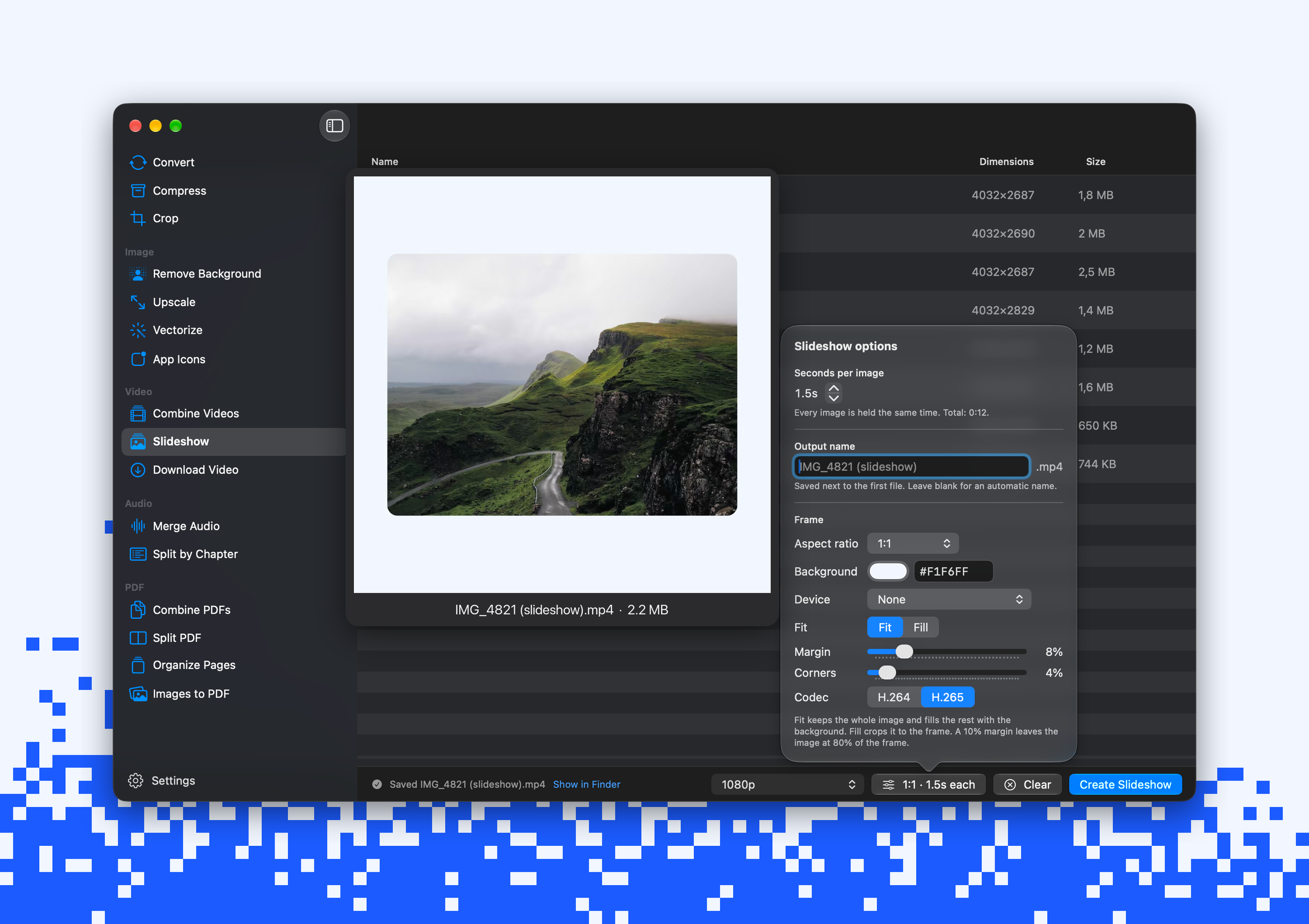
The video is saved next to the first file as <name> (slideshow).mp4. If that name is taken, Picmal counts up instead of overwriting. The status line shows the file count and the finished runtime as you build the list, so you know how long the video will be before you make it.
- Drag rows to reorder; the number on each row is its position in the video.
- Select rows and press Delete to remove them, or right-click for Trim…, Remove and Show in Finder.
- A file Picmal can’t read shows a warning and blocks the create. Remove it and try again.
Videos in a slideshow
Section titled “Videos in a slideshow”Drop a screen recording between your photos, or build a slideshow from one recording alone. Each video gets the same frame and margin as the images, plays at its own length, and keeps every frame at its original time.
Videos keep their sound and the images stay silent around them. Turn off Keep video sound in the options popover to drop it.
To play only part of a video, right-click it and choose Trim…. Type a start and an end in seconds and click Trim. A trimmed row shows a small badge, and Reset in the same sheet brings the full clip back.
Resolution
Section titled “Resolution”The picker in the bottom bar sets the frame size of the video.
| Option | Frame size |
|---|---|
| Match Largest Image | Sized to your biggest file, capped at 4096 px on the long edge |
| 4K | 2160p |
| 1080p | Full HD. Default. |
| 720p | HD |
The Frame section of the options popover decides the shape of the video and how each image sits in it.
| Setting | What it does |
|---|---|
| Aspect ratio | 16:9, 4:3, 1:1, 9:16, 3:2, or Custom to type your own. Ratios are literal: 16:9 is always wide, 9:16 is tall. |
| Background | The color behind the images. Use the color well or type a hex value. Default: black. |
| Device | None, a drawn phone with a pill cut-out or a punch-hole, or Choose image… for a mockup of your own. |
| Finish | The color of a drawn phone: black, silver or natural. |
| Fit | Fit shows each image whole with the background around it. Fill covers the frame and crops the overflow. |
| Margin | Insets everything from each edge, 0 to 40%. 10% leaves the image at 80% of the frame. |
| Corners | Rounds each image and video, 0 to 50% of its short side. 50% makes a pill. |
| Codec | H.264 (default) or H.265, for a smaller file. |
A mockup picture works when its screen is transparent or one plain color: Picmal finds the screen and plays everything inside it. In a device, every image and video fills the screen, so Fit and Corners don’t apply.
One recording at 1:1, Match Largest Image, a light background, a margin and some rounded corners comes out as a framed clip ready to post.
Seconds per image and output name
Section titled “Seconds per image and output name”The options popover also sets how long each image is held (0.5 to 30 seconds, default 3) and the file name. Every image gets the same time on screen; videos play at their own length. Leave the name blank for the automatic <name> (slideshow) name. The video is always saved next to the first file.
The output is an MP4 with images at 30 fps, encoded on the Mac’s hardware media engine. HEICs, sideways iPhone photos, CMYK images and transparent PNGs are all handled. Picmal turns them upright and flattens transparency onto the background before it encodes.
Use them from Shortcuts and the terminal
Section titled “Use them from Shortcuts and the terminal”- In Shortcuts, the Combine Videos action takes videos in and returns the finished file. See Integrations.
- From the terminal, use
picmal-cli combine-videosto join clips andpicmal-cli slideshowto build a slideshow. See Command line.
Slideshow is app and command line only for now. There’s no Finder or Shortcuts equivalent yet.
The Video section also has Download Video, which fetches videos from a link and makes sure the result opens in QuickTime. To make a video file smaller, see compressing files.